Live

Relay

A desktop voice agent for Google Workspace and grounded local tasks, combining hosted Gemini Live conversation with local Gemini CLI execution on the connected machine.

Voice-First Desktop Agent

Google Workspace workflows with grounded local execution

Relay keeps the conversation live and voice-driven, while making sure execution stays connected to the user's actual desktop state instead of drifting into detached assistant output.

Real-time voice conversation instead of turn-based text chat
Grounded local execution through Gemini CLI on the connected machine
Google Workspace workflows through explicit extension authorization
Hosted live session orchestration with durable task continuity
Desktop app interface with voice playback, transcript, and task visibility
Public landing page, repository, and downloadable builds for macOS and Windows

What Problem It Solves

Relay is built for the gap between talking to an assistant and actually getting work done across Google Workspace plus the local desktop. Instead of forcing users to bounce between a chat box, files, browser tabs, and Google tools, Relay keeps those actions inside one voice-first workflow.
Why LaunchForge Built It

Relay exists to test a stronger product pattern than generic chat assistants: keep the live conversation in a hosted core, but let grounded execution happen on the user’s real machine when the task requires local state, files, apps, or browser context.

Current Product Position

Relay has a public landing page, a public repository, a public demo video, and downloadable desktop builds. The current public positioning is judges-first and early-access oriented, but the product is already presented as a live desktop agent with a clear setup path, system boundary, and real workflow promise.

What The Public Proof Already Shows

The public materials already do useful trust work: the landing page explains the architecture and setup flow, the GitHub repository exposes the implementation scope, and the demo video shows the intended voice-driven workflow before someone installs anything.

Evidence From The Public Product

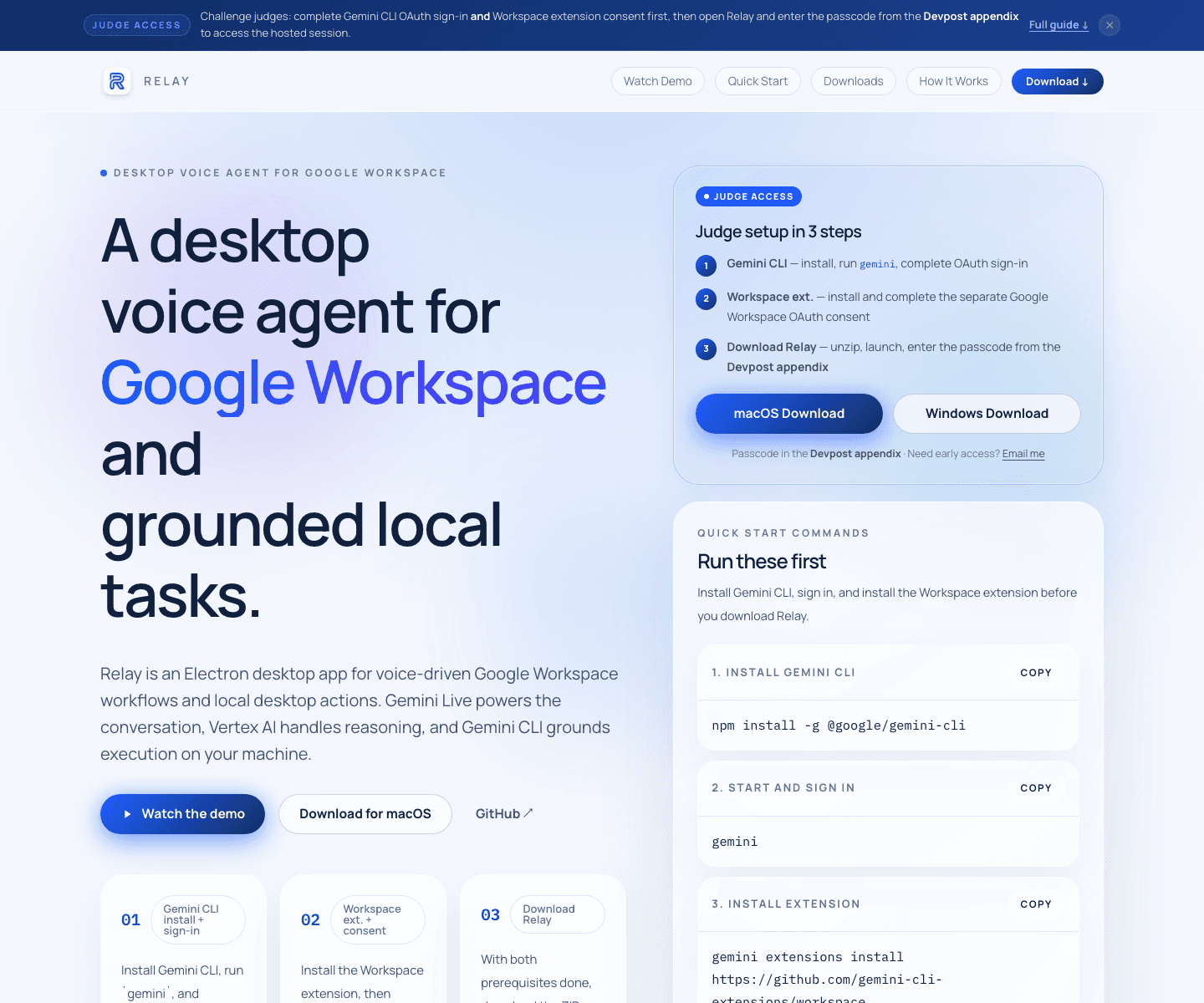
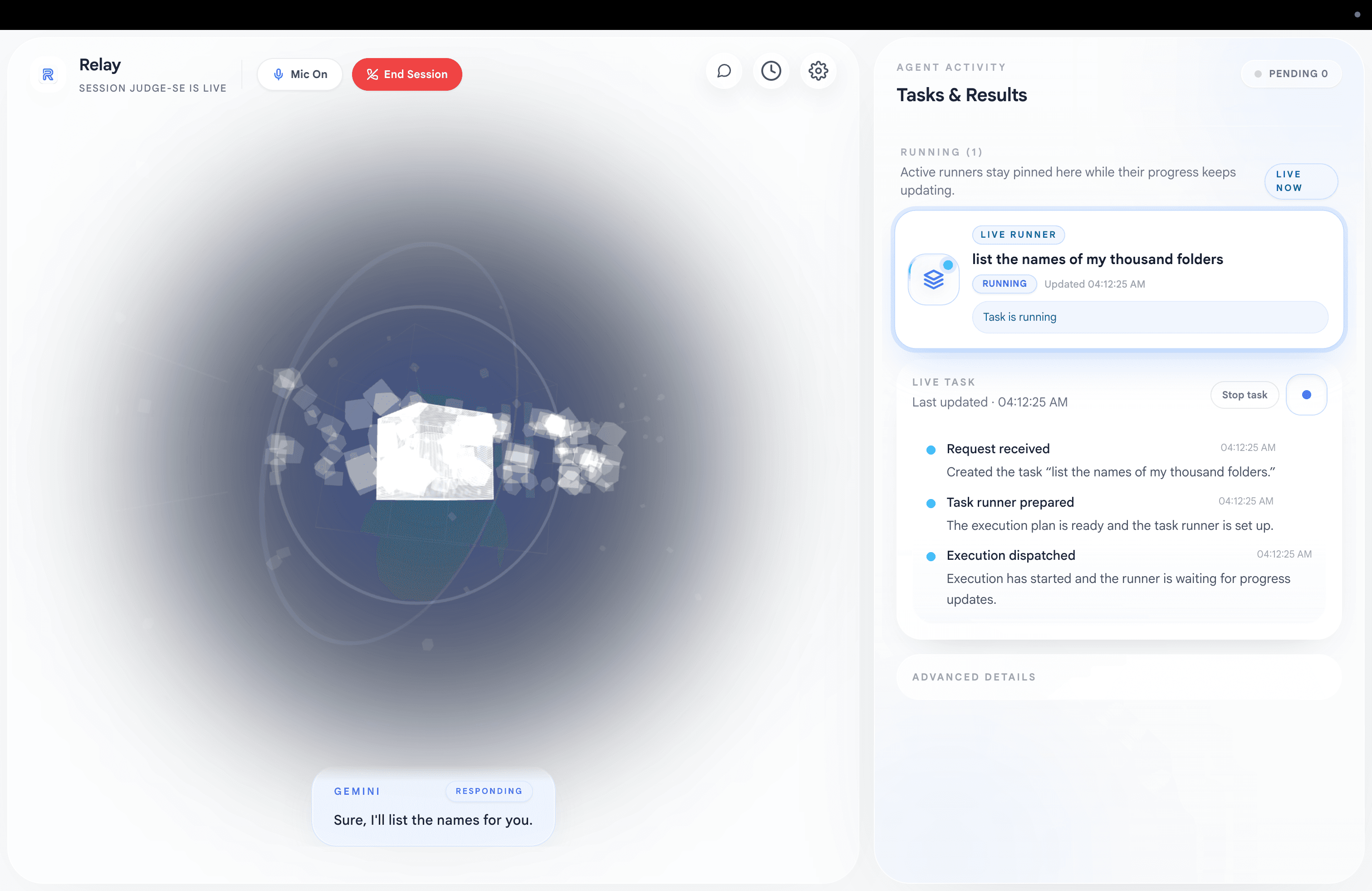
These captures show both sides of the public Relay story: the setup and positioning on the landing page, and the live desktop interface shown in the public demo.

Relay landing page showing the desktop voice agent headline, judge setup steps, and quick-start commands

Landing Page With Setup Clarity

The public landing page does more than market the product. It explains the desktop voice-agent promise, the judge-access flow, the quick-start commands, and the download path before installation.

Relay desktop interface showing the live voice session and task results panel

Product UI And Task Visibility

This public demo frame shows the Relay desktop surface itself: the live voice session, the active task runner, and the results panel that keeps background execution visible instead of hiding it behind a chat transcript.

How Relay Works

Relay is strongest when the system boundary stays explicit: voice at the desktop surface, orchestration in the hosted core, and grounded actions on the connected machine.

Talk to Relay through the desktop app

Relay uses an Electron desktop surface for voice input, playback, transcript visibility, and task continuity so the assistant feels conversational instead of form-driven.

Let the hosted core manage the live session

The cloud core owns the Gemini Live session, orchestration, and canonical task state instead of hiding product logic inside the local shell.

Execute grounded local work on the connected machine

When a task needs real device context, Relay delegates local execution through Gemini CLI so files, apps, and browser state stay grounded in the actual machine.

Bridge Google Workspace and local context

With the authorized Workspace extension in place, Relay can connect Docs, Drive, Gmail, and local desktop work without making the user manually stitch those steps together.

Public Access And Setup Notes

Relay is publicly presented through its landing page, repository, demo video, and downloadable builds for macOS and Windows. The current setup still expects Gemini CLI sign-in and Workspace extension authorization before the full workflow is available, and the public landing page currently frames access as judges-first or early access.